
How do I scan a filter with the mobile app?
To record a filter, first identify the equipment (tap, shower…) in SILAB, then scan the QR code of the new filter: its reference is filled in automatically.
-
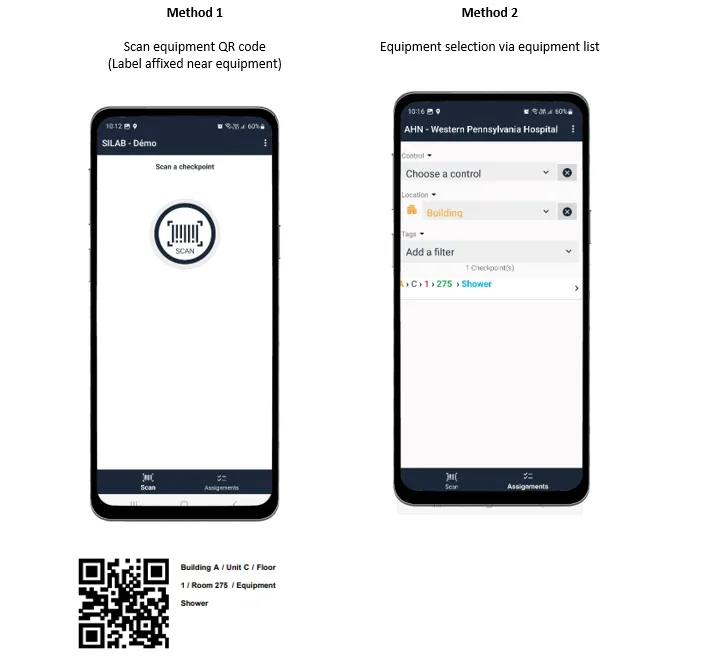
Identify the equipment in SILAB
Three options:
- Scan the QR code placed near the sanitary equipment, using the scan button in the middle of the screen (1st tab: Scan). These labels are provided by customer service: support@silab.cloud.
- Pick the equipment from the list (2nd tab: Checkpoints).
- Scan the previous filter already recorded in SILAB: with an internet connection, the app finds the associated equipment.
-
Record the reference of the new filter
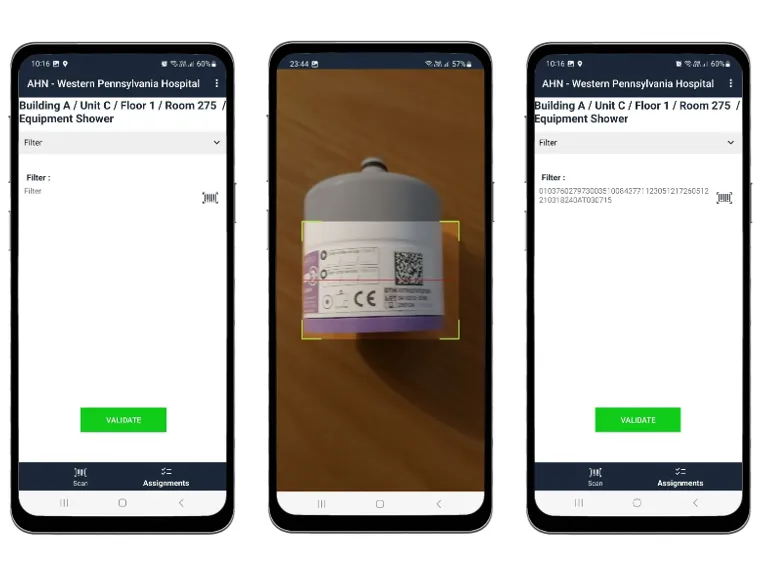
- Tap the SCAN icon on the left (photo 1).
- Hold the filter’s QR code in front of the device (photo 2).
- The reference is filled in automatically (photo 3).
-
Check the reference, then confirm.